Monthly Archives: February 2012

How to save money as you crop and enlarge your pictures with My Digital Studio

Here’s how to save money as you crop and enlarge your pictures with My Digital Studio!  Doesn’t that sound great?

Have you ever taken a picture into the photo store to be enlarged for a scrapbook layout?  It can cost $5 or $10 just for a 5 x 7″enlargement – and that is if you are simply enlarging the whole picture.  You may need to pay extra to get them to zoom in on a particular part of the picture, cropping out the rest!

I love using My Digital Studio for my digital scrapbooking, and one of the biggest reasons is that I can crop and enlarge pictures on the fly!  No waiting, and no big expense!  Let me show you two examples:

1) Giant size pictures (LOL)

Here are two pages that I made about my trip to Utah this past summer, where I went hiking in Arches National Park.  In the Visitors Center, I took a picture  of this cool 3D topographical map, and then blew it up to giant size so I could add labels for the different areas that I hiked and visited!  I made it so big that I had to split it between two pages, so here is the left page and then the right page:
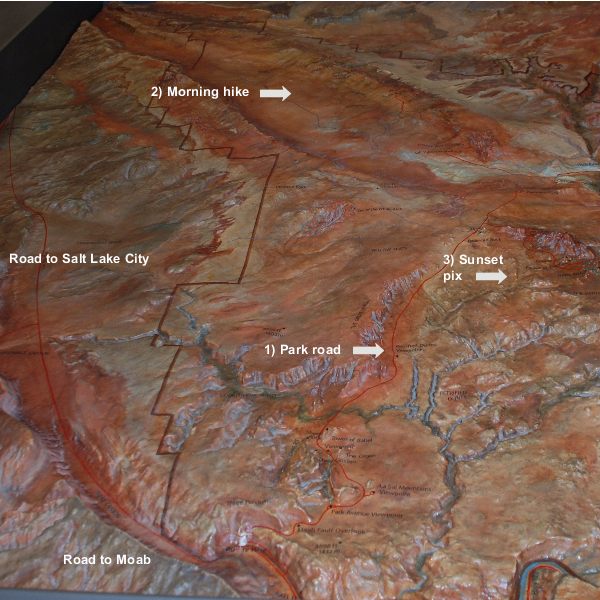
My Digital Studio photo enlargement layout - left page

My Digital Studio photo enlargement layout - left page


My Digital Studio photo enlargement layout - right page

My Digital Studio photo enlargement layout - right page

Isn’t that cool?  Just imagine how much it would have cost to make TWO 12 x 12″ enlargements of the same picture for this layout!  And, I was able to add captions right on top of the picture to match my journaling on the right.

2) Zooming in on a picture

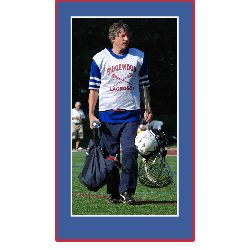
My hubby coaches 8th grade boys lacrosse, and he played in the “Old Goat” game with a bunch of the other alumni and coaches.  Well, I got a great picture of him after the game, but you probably know how big those playing fields are… even with my good Nikon camera and a good zoom lens, I can’t zoom in on just one person from across the field!  Take a look at the difference it makes when I zoom in and crop the picture using My Digital Studio.
Basic photo:
Hubby's full picture

Hubby's full picture

And here is what the picture looks like when I zoomed in on him, cropping out the distracting stuff on the sides:
Cropped photo with triple mat

Cropped photo with triple mat

POW! my eye focuses on him (and he is indeed a handsome fellow, yes?).  I quickly added a white mat around the picture, then inserted a square punch behind it, stretched it to the right size, colored it Pacific Point blue and matted a red mat on the punched shape for a triple mat.  All in about 60 seconds!  And note – if there was not already a Stampin’ Up! color that matched his uniform, I also could have made the punched mat exactly match a color in the picture!

Can you think of some scrapbook pages you have done where this would have been useful?  I bet you’re happy that you see how to save money as you crop and enlarge your pictures with My Digital Studio!
My Digital Studio during Sale-A-Bration

This is absolutely the best time to purchase the intuitive software  My Digital Studio during Sale-A-BrationMy Digital StudioLet me show you how to maximize your savings.  As you may already know, for every $50 you spend on Stampin’ Up! products you get an additional item from the SAB catalog for free!  Sale-A-Bration runs through March 31, 2012.

So let’s see how that can work for you.  If you purchase My Digital Studio for $79.95, you will get one free item!  There are great stamp sets, paper, and fabric selections… Or, if you want to stick with digital design you can choose from two different sets of digital content on a CD for My Digital Studio:

Digital Option #1: One Big Sale-A-Bration CD (127220)

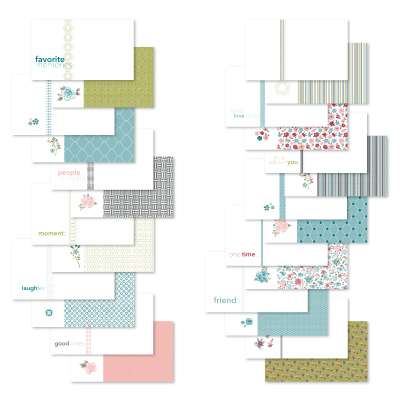
Select item 127220 as your free SAB product and you will receive a CD with ALL of the new, exclusive SAB content in digital format!  You get:

  • 5 stamp brush sets
  • 12 Designer Series Paper Patterns
  • 6 ribbons
  • 5 brads

Digital Option #2: Piece of Cake Ensemble CD (127222)

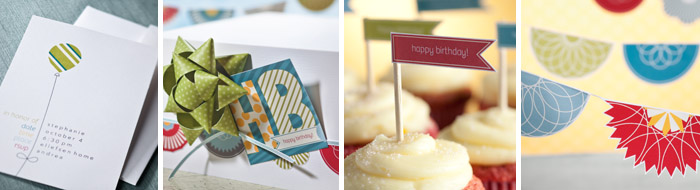
This is a CD with an entire digital kit for hosting a party, including invitation, greeting card, tag and various decor elements.  You get:

  • 72 embellishments
  • 1 punch
  • 37-piece stamp brush set

    MDS SAB Piece of Cake Ensemble CD

    MDS SAB Piece of Cake Ensemble CD

You can get either of these digital CDs free when you purchase My Digital Studio before March 31, 2012.

Ah, now I can hear you thinking… if I get ONE free SAB product for every $50 I spend… and My Digital Studio costs $79.99… simple math tells me that I can spend only an additional $20.01 and get BOTH digital CDs for free!

Let’s look at how you can do that.  You can of course purchase ANYTHING in the Stampin’ Up! product line of rubber stamps, papers, ink pads, die cuts, embossing folders, embellishments, albums, and so on… but let’s assume you are on a roll here with the digital design mode.  What are some options?

From the Occasions Mini Catalog, you can order the:

  • 125615  Twitterpated Swatchbook Designer Template for $12.95.  You get the template for a 26-page swatchbook where you simply drop in your photos… and then you can print multiple books!

    125615L Twitterpated Swatchbook Designer Template

    125615L Twitterpated Swatchbook Designer Template

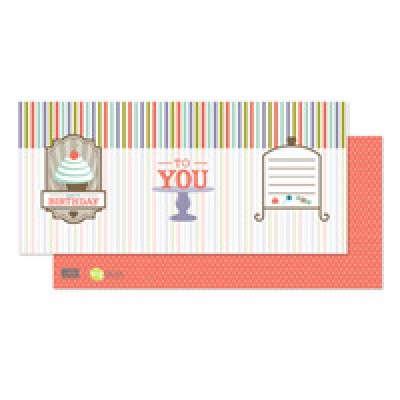
  •  125617 Sweet Shop Trifold Card Designer Template for $1.95.  You get the layout for a colorful trifold double-sided birthday card, ready to create multiple cards in a flash! and you can customize the colors and elements.  It coordinates with other Sweet Shop series products.

    125617S Sweet Shop trifold card template

    125617S Sweet Shop trifold card template

  • 125590 Scented Stampin’ Emboss Powder is not a digital product, but something fun you can use with the trifold card to make a delightful hybrid card… make the cupcake frosting on the card smell like vanilla!  $5.95.

So there you have it: My Digital Software for $79.95, plus $20.85 for the above items, gives you a total of  $100.80 and you get BOTH free SAB digital CDs!

And if you either purchase My Digital Studio from my online store, or try the free 30 day trial of My Digital Studio Express, you can sign up for my free 30 day support classes showing you how to get started!  Click here for more details.

To purchase My Digital Studio, visit my store here or click on “Shop Now” on the top right.  Woo hoo – let the digital designing begin with My Digital Studio during Sale-a-Bration!


My Digital Studio free 30 day trial

You have probably noticed, from past posts, how much I like My Digital Studio, and I am so excited about the My Digital Studio free 30 day trial!

It’s very simple to get the software.  MDS Express TrialSimply click here (or on the Shop Now button on the top right) and you will be taken to my online store, where you can order the software FOR FREE!

Then simply download the My Digital Express software.  The Express version is not terribly large, and you can easily download it even with a regular Internet connection (no high-speed connection needed!).   Your 30 day trial does not start until you launch the My Digital Studio software for the first time… so you can order and download it now and wait until you have a little time to look at it (like maybe this weekend? LOL!).

You may be wondering what you get with this free download… some people don’t believe things are any good if they are free, but I am happy to tell you that you get the exact same version of the My Digital Studio Express software that you can buy for $39.95.  It is intuitive, easy to use and the results are delightful!

When the 30 day trial period is over, you get a reminder that you can buy the software and continue to use it… either the Express version that you already have with the free trial, or the full My Digital Studio software with almost 500 different components such as templates, stamps, Designer Series Papers, punches, embellishments and more!

Still want more info?

  • Aha, I hear you asking: what is the difference between the full My Digital Studio and the My Digital Studio Express?  Click here and I will fill you in!]
  • Click here for Frequently Asked Questions about the free trial
  • Contact me at carol@carolGpapercrafts.com if you have more questions!

You may also be wondering how to get going with the software!  If you order it through me, I will be happy to offer you free orientation and tips over the 30 day trial.  After I get notification from Stampin’ Up! that you have ordered the free trial, I will send you an email where you can sign up for my free orientation program!  More info coming soon!

So what are you waiting for?  Click here to get started with your My Digital Studio free 30 day trial!


My Digital Studio 30 day free trial offer

I am so excited to let you know about the My Digital Studio 30 day free trial offer!

You can download it immediately by adding item 129600 to an online order.  Click on “Shop Now” on the top right or click here for more information about the My Digital Studio 30 day free trial offer!